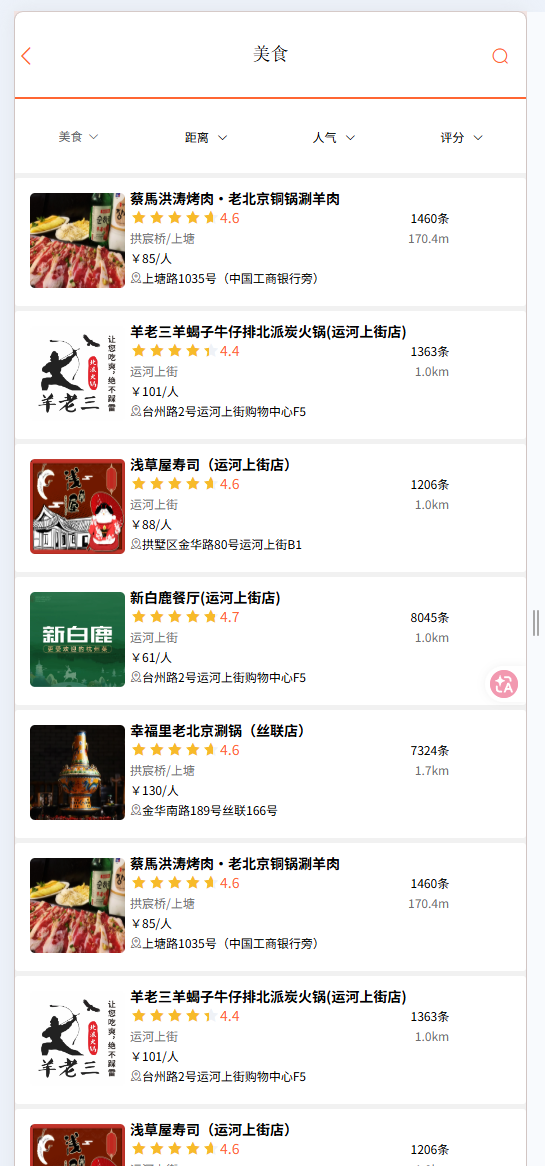
在首页点击某个频道,即可看到频道下的商户
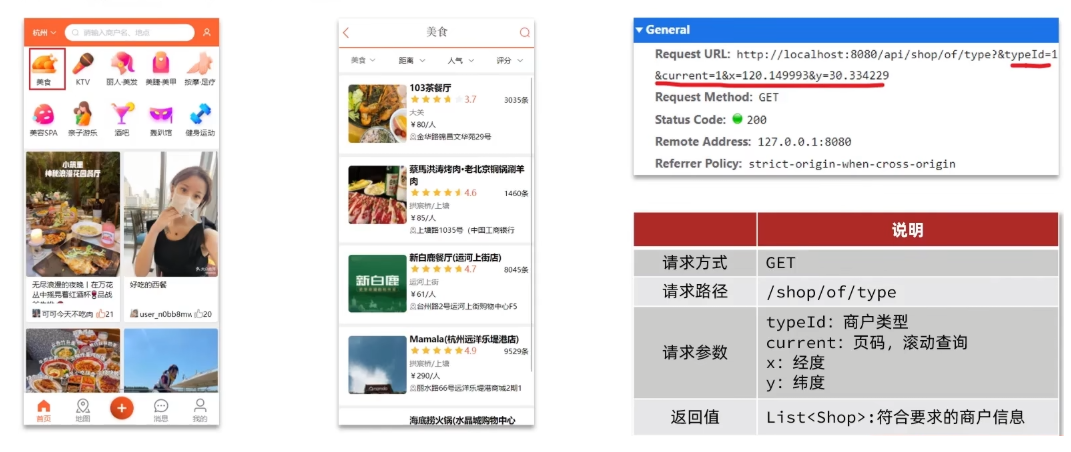
前端发请求携带的经纬度坐标是指:当前登录用户的坐标,真实项目中经纬度坐标会对接第三方接口获取,实时定位不会写死。
- 数据库存储分析
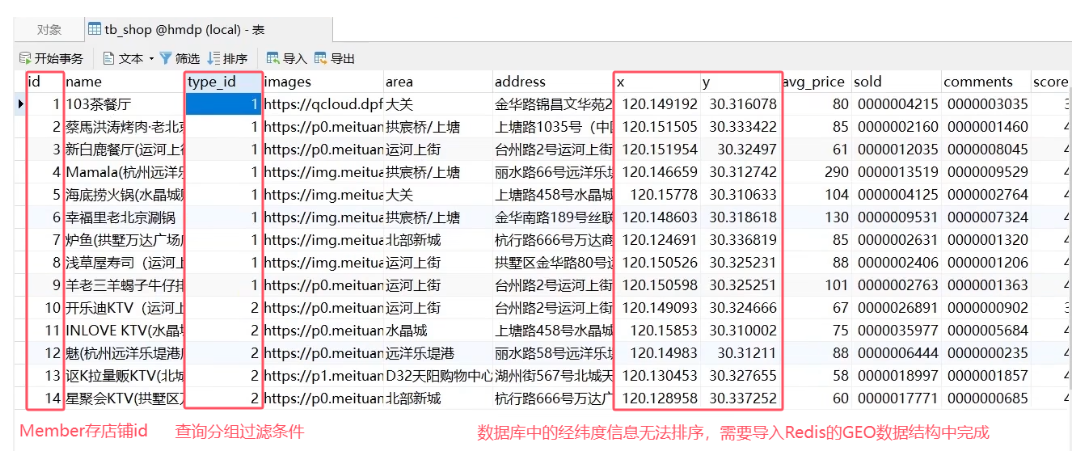
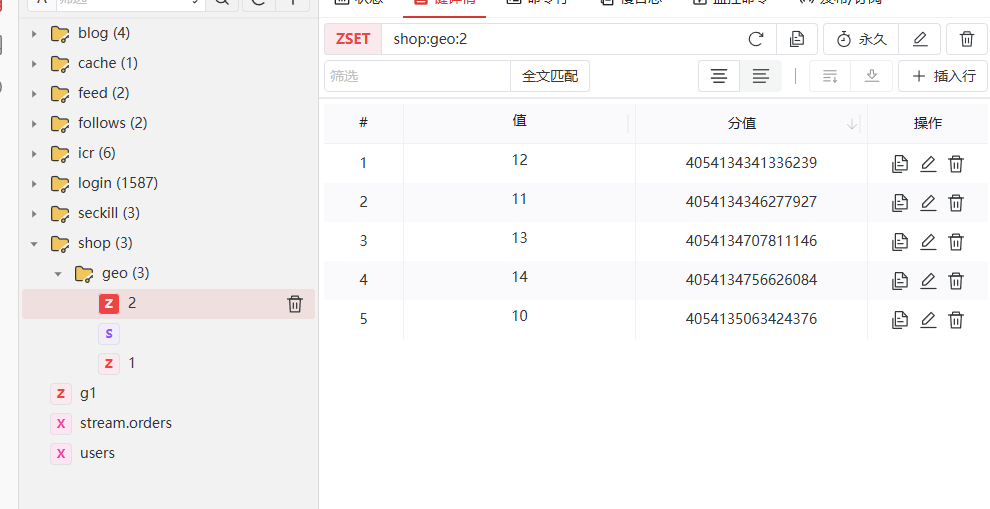
存储方案设计:按照商户类型分组,类型相同的商户作为同一组,以typeId为key存入同一个GEO集合即可。
将数据库已经存在的店铺数据按照typeId分度导入Redis
java
/**
 * 执行loadShopData相关业务逻辑。
 *
 * 作用:
 * 1.查询店铺信息;
 * 2.把店铺分组,按照typeId分组,typeId一致的放到一个集合;
 * 3.分批完成写入Redis;
 * 4.获取类型id;
 * 5.获取同类型的店铺集合;
 *
 * @return无返回值
 */
@Test
void loadShopData(){
    //1.查询店铺信息
    List<Shop> list=shopService.list();
    //2.把店铺分组,按照typeId分组,typeId一致的放到一个集合
    Map<Long,List<Shop>> map=list.stream().collect(Collectors.groupingBy(Shop::getTypeId));
    //3.分批完成写入Redis
    for(Map.Entry<Long,List<Shop>> entry:map.entrySet()){  //entrySet 键值对集合,一对一对拿出来遍历
        //3.1.获取类型id
        Long typeId=entry.getKey();
        String key="shop:geo:" +typeId;
        //3.2.获取同类型的店铺集合
        List<Shop> value=entry.getValue();
        List<RedisGeoCommands.GeoLocation<String>> locations=new ArrayList<>(value.size());
        //3.3.写入RedisGEO
        for (Shop shop : value) {
            //stringRedisTemplate.opsForGeo().add(geoKey, new Point(shop.getX(), shop.getY()), shop.getId().toString());
            locations.add(new RedisGeoCommands.GeoLocation<>(
                    shop.getId().toString(),
                    new Point(shop.getX(), shop.getY())
            ));
        }
        //批量写入Redis的GEO
        stringRedisTemplate.opsForGeo().add(key, locations);
    }
}
- 为了使用GEOSEARCH命令,引入新版本lettuce和spring-data-Redis依赖,排除旧版本依赖
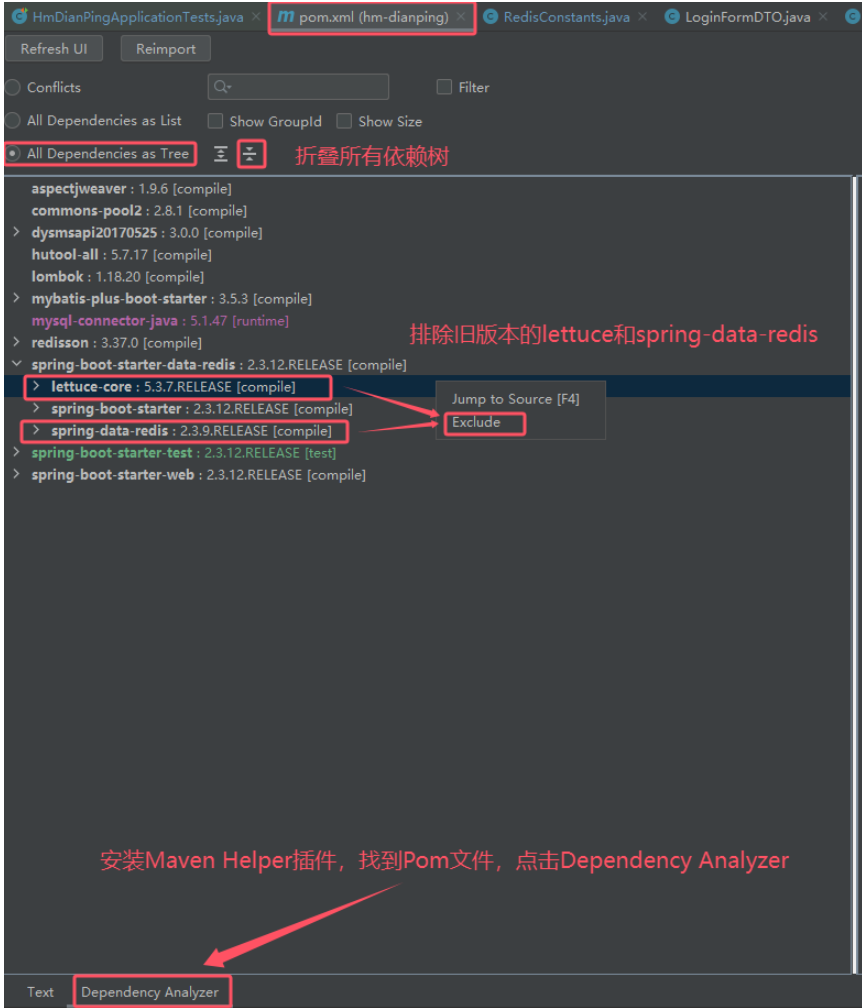
- pom.xml
spring-data-redis相关依赖:
xml
<dependency>
    <groupId>org.springframework.boot</groupId>
    <artifactId>spring-boot-starter-data-redis</artifactId>
    <exclusions>
        <exclusion>
            <artifactId>lettuce-core</artifactId>
            <groupId>io.lettuce</groupId>
        </exclusion>
        <exclusion>
            <artifactId>spring-data-redis</artifactId>
            <groupId>org.springframework.data</groupId>
        </exclusion>
    </exclusions>
</dependency>
<!-- 引入新版本lettuce和spring-data-redis -->
<dependency>
    <groupId>org.springframework.data</groupId>
    <artifactId>spring-data-redis</artifactId>
    <version>2.6.2</version>
</dependency>
<dependency>
    <groupId>io.lettuce</groupId>
    <artifactId>lettuce-core</artifactId>
    <version>6.1.6.RELEASE</version>
</dependency>- ShopServiceImpl:在普通查询数据库基础上,增加查询附近商户功能
java
/**
 * 根据类型分页查询商铺。
 *
 * 作用:
 * 1.判断是否需要根据坐标查询;
 * 2.不需要坐标查询,按数据库查询;
 * 3.返回数据;
 * 4.计算分页参数;
 * 5.查询Redis、按照距离排序、分页。结果:shopId、distance;
 *
 * @param typeId商铺类型id
 * @param current当前页码
 * @param x经度
 * @param y纬度
 * @return处理结果
 */
@Override
public Result queryShopByType(Integer typeId, Integer current, Double x, Double y) {
    //1.判断是否需要根据坐标查询
    if(x==null|| y==null){
        //不需要坐标查询,按数据库查询
        Page<Shop> page=query().eq("type_id",typeId).page(new Page<>(current, SystemConstants.DEFAULT_PAGE_SIZE));
        //返回数据
        return Result.ok(page.getRecords());
    }
    //2.计算分页参数
    int from=(current-1)*SystemConstants.DEFAULT_PAGE_SIZE;
    int end=current*SystemConstants.DEFAULT_PAGE_SIZE;
    //3.查询Redis、按照距离排序、分页。结果:shopId、distance
    String key=SHOP_GEO_KEY+typeId;
    GeoResults<RedisGeoCommands.GeoLocation<String>> results=stringRedisTemplate.opsForGeo()
            .search(
                    key,  //从redis查附近店铺
                    GeoReference.fromCoordinate(x,y), //以当前x,y为中心
                    new Distance(5000), //查附近5000米的店铺
                    RedisGeoCommands
                            .GeoSearchCommandArgs
                            .newGeoSearchArgs()
                            .includeDistance()  //把距离也查出来
                            .limit(end) //最多查end条
            );
    //4.解析出id
    if(results==null) {
        return Result.ok(Collections.emptyList());
    }
    List<GeoResult<RedisGeoCommands.GeoLocation<String>>> list = results.getContent();
    //4.1.截取from~end的部分
    List<Long> ids=new ArrayList<>(list.size());
    Map<String,Distance> distanceMap=new HashMap<>(list.size());
    list.stream().skip(from).forEach(result->{  //skip跳过from条数据
        //4.2.获取店铺id
        String shopIdStr=result.getContent().getName();
        ids.add(Long.valueOf(shopIdStr));
        //4.3.获取距离
        Distance distance= result.getDistance();
        distanceMap.put(shopIdStr,distance);
    });
    //5.根据id查询Shop
    String idStr=StrUtil.join(",",ids);
    List<Shop> shops=query().in("id",ids).last("ORDER BY FIELD(id,"+idStr+")").list();
    for(Shop shop:shops){
        shop.setDistance(distanceMap.get(shop.getId().toString()).getValue());
    }
    //6.返回
    return Result.ok(shops);
}- 测试效果